
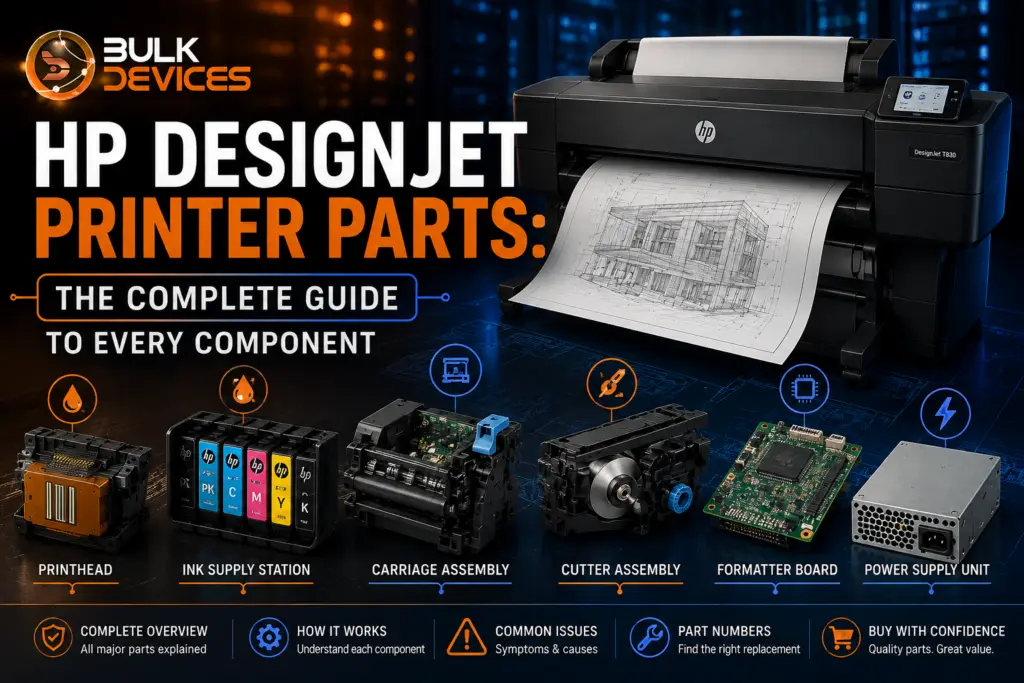
Quick Answer: What Are the Main Parts of an HP DesignJet Printer?
An HP DesignJet printer is built from five core component groups: the ink system (printhead, cartridges, Ink Supply Station), the paper handling and cutting system (cutter assembly, spindle, pinch rollers, platen), the motion system (carriage assembly, belt, encoder strip, carriage motor), the electronics (formatter board, control panel, power supply unit), and the maintenance system (service station, maintenance cartridge). Each part fails in a different, recognisable way, which makes correct identification the first step before ordering a replacement.
- The printhead and Ink Supply Station control print quality and ink delivery.
- The cutter assembly trims finished prints cleanly off the roll.
- The carriage assembly and encoder strip control precise left-to-right print head movement.
- The formatter board and power supply unit control the printer’s electronics and firmware.
- The service station keeps the printhead clean between print jobs.
If you manage or repair an HP DesignJet printer, at some point you’ll need to identify a failed part before you can order the right replacement. This HP DesignJet printer parts guide walks through every major component — what it does, how it fails, and which part number family it belongs to — so you can diagnose faster and buy with confidence. It’s written for UK print shops, reprographics bureaus, architecture and engineering firms, and in-house IT technicians who service T-series, Z-series, and legacy DesignJet models themselves. Whether you’re troubleshooting a fault or simply want a full HP DesignJet spare parts list and components guide before raising a support ticket, this article covers every subsystem in one place.
By the end of this guide, you’ll be able to match a symptom to the correct component family and locate its part number with confidence.
How an HP DesignJet Printer Is Built (System Overview)
An HP DesignJet printer is made up of five interconnected systems that must all work correctly to produce a print. Understanding how these systems work makes it much easier to trace a fault to the right part instead of guessing.
The ink system holds, pressurises, and feeds ink from the cartridge to the nozzles in the printhead. The paper handling system loads media from the spindle, feeds it through the platen, and cuts finished prints. The motion/carriage system moves the printhead across the page (the scan axis), and the paper moves under the printhead (the feed axis). The electronics system (formatter board, control panel, and power supply) controls all other systems and executes the printer’s firmware. The maintenance system is placed with the printer and its four, and maintains the printhead’s cap, wiping and priming when the printer is not in use.
These five core systems rarely fail in isolation. For instance, a worn belt on the motion system may cause banding effects that resemble a printhead problem — hence why the symptom-to-part table later in this guide.
Printhead & Ink System Components
The ink system encompasses anything in between the ink cartridge and the dot of ink that hits the page, and is the subsystem that most likely will impact visible print quality.
Printhead
The HP DesignJet printhead that contains the hundreds of tiny nozzles that squirt out the ink onto the media. Every printhead is assigned to a colour set, and a single nozzle row blockage will result in noticeable banding or a line missing from the print. Printheads are consumables and often one of the first parts that is examined when the quality of the print seems to be suffering, since clogged nozzles cause streaky or incomplete prints. The printhead can be replaced by the user on most models of DesignJet without a service call.
Ink Cartridge
An ink cartridge is the container that holds one colour of ink, and is usually sealed so it can be used with the printhead. A smart chip, which also tells the firmware when it has been installed into a scanner or printer, is a genuine HP cartridge, and when the cartridge will expire reports the ink level and expiry to the firmware; this is why third-party cartridges sometimes give false ink level warnings even if they print well.
Ink Supply Station (ISS)
The Ink Supply Station (ISS) is the docking bay that keeps the ink cartridges in place and controls ink pressure and flow to the tubes. On larger-format Design Jets, the ISS also maintains air pressure to ensure uniform ink flow over long print runs. Typical symptoms of a failing ISS are inconsistent ink flow or the printer not acknowledging the ink cartridge even though it is in perfect working order.
Ink Tubes
Ink tubes carry ink from the ISS to the printhead carriage. If punctured, kinked, or blocked with dried ink after long periods of inactivity, they commonly cause ink starvation or colour contamination.
Paper Handling & Cutting Components
All media loading, feeding, and trimming takes place within this subsystem, which is one of the most mechanically active areas on any HP DesignJet printer.
Cutter Assembly
The HP DesignJet cutter assembly is the motorized blade assembly that moves across the platen to cut a finished print clean from the roll. A failed cutter assembly will manifest as jagged or imperfect cuts, a stalled cutting action, or a “cutter error” on the front panel, which can be caused by a worn clutch or a blade that has gone loose. This is the problem that the CQ890-67017 cutter assembly for the T120/T520 series is engineered to fix — a true HP replacement piece, consisting of the cutter body, clutch, and extrusion cover fitted as a complete assembly, removing the entire mechanism — not just the blade.
Spindle
Paper roll is stored in the spindle and fed to the printer through a tension control system. If the spindle is bent or worn, it feeds paper unevenly, and the prints will be skewed.
Pinch Arms / Rollers
Pinch arms press the media tightly against the drive rollers, ensuring that the paper moves in a straight, controlled line. A frequent problem with worn pinch rollers is that paper slips, or the media does not even move.
Platen
The platen is the flat surface under the printhead that supports the media being printed or cut. Head strikes or scuffed prints may occur due to debris, ink build-up, or a warped platen.
Carriage & Motion Components
The motion system plays a key role in the accuracy of positioning the printhead, typically with sub-millimetre precision, on each pass, making it one of the more precision-dependent subsystems of the printer.
Carriage Assembly
The HP DesignJet carriage assembly is the part that actually carries the printhead and moves back and forth along the scan axis while printing. A print head crash, an abnormal carriage noise, or a printer that doesn’t initialise at startup time are common symptoms of a failing carriage assembly.
Carriage Belt
Carriage belt – a toothed belt that moves the carriage assembly along the rails. A slipping or stretching belt results in colour misregistration and horizontal banding.
Encoder Strip / Disk
A sensor mounted on the carriage scans a thin strip of film with fine markings on it—this is called the HP DesignJet encoder strip—that keeps track of the precise horizontal position in real time. The paper-feed axis has a matching encoder disk. A dirty, scratched, or smudged encoder strip is one of the most frequent reasons for banding because the printer doesn’t have accurate position data, even though the mechanical components may be in good condition.
Carriage Motor
The carriage motor is used to drive the belt and hence the carriage assembly. When the motor stops working, it makes grinding noises or stalls during print, or the carriage won’t move.
Electronics & Control Components
The electronics system ties every mechanical subsystem together and runs the firmware that interprets each print job.
Formatter / PCA Board
The formatter board (also called the PCA board) is the printer’s main logic board — it processes incoming print jobs, runs the firmware, and communicates with every other subsystem. A failing formatter board can cause the printer to freeze, fail to boot, or lose network connectivity entirely.
Control Panel Assembly
The control panel is the front-facing screen and button interface used to configure settings and monitor printer status. A dead or unresponsive control panel doesn’t always mean the printer itself has failed — it’s worth checking the ribbon cable connection to the formatter board first.
Power Supply Unit (PSU)
The HP DesignJet power supply unit converts mains power into the regulated voltages the rest of the printer needs to operate. A printer that won’t power on at all, or that powers off unexpectedly under load, points to the PSU well before any other component.
Maintenance & Service Components
These parts don’t touch the printed page directly, but without them, print quality degrades quickly.
Service Station
The HP DesignJet service station caps, wipes, and primes the printhead automatically whenever the printer is idle, preventing ink from drying in the nozzles between jobs. A worn service station is a frequent, and frequently overlooked, cause of print quality complaints that get wrongly blamed on the printhead itself.
Maintenance Cartridge / Kit
The maintenance cartridge collects waste ink and cleaning fluid from servicing routines, while the wider HP DesignJet maintenance kit typically bundles wipers, a spittoon, and other consumable service parts. Ignoring a “replace maintenance cartridge” warning eventually leads to ink overflow inside the printer chassis.
HP DesignJet Parts Glossary Table
This HP DesignJet parts glossary is a quick reference once you’ve narrowed down which area of the printer is likely affected. Each part name below matches the terminology used consistently throughout this guide — in the body text, the symptom table, and here — so you can move between sections without confusion. Use it alongside the symptom-to-part table that follows to confirm your diagnosis before ordering a replacement, whether you’re checking a genuine HP part number or comparing a compatible alternative.
| Part | Function | Common Failure Symptom |
|---|---|---|
| Printhead | Fires ink through nozzles onto the media | Streaky prints, missing lines, banding |
| Ink Cartridge | Stores and supplies a single ink colour | Inaccurate ink-level readings, colour dropout |
| Ink Supply Station (ISS) | Holds cartridges and regulates ink pressure | Inconsistent ink delivery, cartridge not recognised |
| Ink Tubes | Carry ink from the ISS to the printhead | Colour contamination, ink starvation |
| Cutter Assembly | Trims finished prints from the roll | Jagged cuts, cutter error, stalled blade |
| Spindle | Holds and feeds the paper roll | Skewed or uneven paper feed |
| Pinch Arms/Rollers | Press media against drive rollers | Paper slipping, media not advancing |
| Platen | Supports media under the printhead | Head strikes, scuffed prints |
| Carriage Assembly | Holds and moves the printhead across the page | Head crashes, carriage noise, failed start-up |
| Carriage Belt | Drives the carriage along its rail | Horizontal banding, misaligned colours |
| Encoder Strip/Disk | Tracks precise carriage/paper position | Banding, positioning errors |
| Carriage Motor | Powers carriage movement | Grinding noise, stalling, no movement |
| Formatter/PCA Board | Runs firmware, processes print jobs | Freezing, failure to boot, lost connectivity |
| Control Panel | Front-facing display and controls | Unresponsive screen, blank display |
| Power Supply Unit (PSU) | Converts mains power to regulated voltages | Won't power on, unexpected shutdown |
| Service Station | Caps and wipes the printhead when idle | Gradual print quality decline |
| Maintenance Cartridge | Collects waste ink and cleaning fluid | Maintenance warnings, ink overflow |
What’s Broken? Symptom-to-Part Quick Reference
If you don’t yet know which part is at fault, start here. Match the symptom you’re seeing to the most likely component in this HP DesignJet troubleshooting table before ordering anything.
| Symptom | Likely Part |
|---|---|
| Paper won't cut / jagged cuts | Cutter Assembly |
| Streaky or missing lines in prints | Printhead |
| Printer won't power on | Power Supply Unit (PSU) |
| Horizontal banding across prints | Carriage Belt or Encoder Strip |
| Paper feeds crookedly or skews | Spindle |
| Cartridge not recognised / ink delivery uneven | Ink Supply Station (ISS) |
| Printer freezes or won't boot | Formatter/PCA Board |
| Print quality declines gradually over weeks | Service Station |
| Paper slips or won't advance | Pinch Arms/Rollers |
| Grinding noise from the carriage | Carriage Motor |
How to Find the Right Part Number for Your Printer
Always verify the exact model and part number of your printer before ordering replacements, as DesignJet parts are not interchangeable between series, even if two models appear to be very similar.
Use the model number and serial number label, typically on a plate on the back or bottom of the printer chassis. This is a model plate that specifies the exact printer variant; this is important as the same-named part (for instance, a cutter assembly) may exist in a number of slightly different part numbers across the range of T120, T520, T730, and T830 printers. If you have the model number, refer to HP’s official parts list or the printer’s service manual for the exact part number, and not just the “Looks like” part number. If the fault has already generated an error code on the screen, record that code – there may be a direct correlation between that code and a specific component family in HP’s diagnostic documentation.
Genuine HP Parts vs Compatible Alternatives
The decision between genuine vs compatible HP DesignJet parts depends on the printer’s usage; it’s a choice of up-front price versus long-term reliability.
If the part affects calibration or safety, such as the printhead, formatter board, or power supply unit, it is safer to use genuine HP (OEM) parts. These are made to HP’s original specifications and tolerances and are generally covered by the manufacturer’s warranty, although the warranty period can vary depending on the part and region. Compatible or aftermarket parts, such as third-party cutter assemblies or ink cartridges, are usually more affordable and can work well for certain mechanical wear parts, but quality can vary, and some may affect the printer’s warranty. As a general rule, compatible alternatives are best suited to mechanical wear parts, while electronic components that directly affect print quality or printer performance are better kept genuine.
Maintenance Tips to Extend Component Life
Most DesignJet component failures are gradual rather than sudden, which means a simple HP DesignJet maintenance tips routine can meaningfully extend the life of the parts covered in this guide.
- Clean printheads and run a nozzle check regularly, especially after periods of inactivity, to prevent dried ink from causing permanent clogging.
- Clean the cutter rail and platen area to remove dust and paper debris that can jam the cutter assembly or scuff prints.
- Keep firmware updates current, since HP periodically ships firmware fixes for carriage calibration and electronics stability.
- Use the correct media type and weight specified for your model to reduce strain on the pinch rollers and cutter assembly.
- Keep the printer environment free of dust and debris, particularly around the encoder strip, where even light smudging can cause positioning errors.
Frequently Asked Questions
What are the main parts of an HP DesignJet printer?
The main parts of an HP DesignJet printer are the printhead and Ink Supply Station, the cutter assembly and paper handling components, the carriage assembly and motion system, the formatter board and power supply, and the service station.
What is the most common HP DesignJet part to fail? The printhead is the most commonly replaced HP DesignJet part, since clogged nozzles from dried ink cause visible print quality issues faster than most other components.
How do I find the right part number for my HP DesignJet model?
Check the model plate on the rear of your printer for the exact model and serial number, then match that against HP’s official parts list before ordering any replacement component.
Are compatible (non-genuine) HP DesignJet parts safe to use?
Compatible HP DesignJet parts can be safe for mechanical wear parts like cutter assemblies, but genuine HP parts are generally recommended for printheads, formatter boards, and other calibration-sensitive components.
What does the cutter assembly do on a DesignJet printer?
The cutter assembly is the motorised blade unit that travels across the platen to trim a finished print cleanly from the paper roll once printing is complete.
How often should HP DesignJet maintenance parts be replaced?
Maintenance cartridges and service station components should be replaced when the printer’s firmware displays a maintenance warning. Since replacement intervals depend on print volume rather than a fixed schedule, check the model’s specific maintenance recommendations with the team.
Finding the Right Part for Your DesignJet
As with any DesignJet repair, the hardest part is pinpointing the correct part name and number — once you have that, ordering the right replacement is straightforward. If you’d rather not guess, see our full range of HP DesignJet spare parts at BulkDevices, covering the ink, paper handling, motion, electronics, and maintenance systems discussed in this guide, all stocked for HP large format printer parts UK delivery. If you’re not yet certain which category your fault falls under, you can also browse printer accessories and spare parts to explore the wider range before committing to a specific part number.